Purchases and downloads are processed securely through MetaQuotes official MQL5 Market with automatic terminal updates.
Open in MetaTrader 5 StoreSmart FVG indicator
Premium MT5 INDICATOR Tool
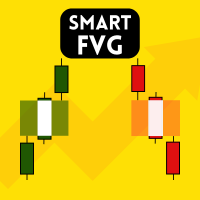
Smart FVG Indicator MT5 – Fair Value Gap and Imbalance Detection Smart FVG Indicator MT5 is a professional Fair Value Gap (FVG) and Imbalance detection tool for MetaTrader 5. It is designed for traders who use Smart Money Concepts (SMC) and ICT-style analysis to study market structure, liquidity and price inefficiencies. The indicator automatically scans price action to find valid Fair Value Gaps and Imbalance zones, then draws and updates these zones directly on the chart. This helps you see where price has moved with displacement and where potential liquidity areas may exist. Main Features Fair Value Gap (FVG) and Imbalance detection: highlights relevant price gaps and imbalance zones based on candle structure. Imbalance Filter: focuses on areas created by strong price displacement or liquidity shifts, removing random or insignificant gaps. Body Average Filter: compares candle body siz
ALGORITHMIC CAPABILITIES
- Sub-millisecond signal calculation with 100% non-repainting logic
- Adaptive multi-timeframe detection (M1, M5, M15, H1, H4, D1)
- Instant MT5 Mobile Push Notifications, Desktop Sound & Email Alerts
- Lifetime license updates and direct priority developer support
Technical Parameters & Platform Specifications
METAQUOTES MT5 STANDARD| Platform Compatibility | MetaTrader 5 (Build 4000+), Windows 10/11, Cloud VPS |
| Supported Assets & Symbols | EURUSD, GBPUSD, XAUUSD, NDX100 |
| Optimal Timeframes | M5, M15, H1, H4 |
| Signal Calculation Logic | Strictly Non-Repainting (Bar-Close Confirmation) |
| Notification System | MT5 Mobile Push Notifications, Desktop Sound Chimes, Email Alerts |
| Official Store Link | https://www.mql5.com/en/market/product/131881 |
Frequently Asked Questions
Common questions about Smart FVG indicator setup, licensing, and MetaTrader 5 execution.
How do I install Smart FVG indicator in MetaTrader 5? ▾
To install Smart FVG indicator, download the .ex5 file or install directly from the MQL5 Market inside MT5. In your MT5 terminal, go to File > Open Data Folder > MQL5 > Indicators (or Experts), paste the file, right-click Navigator and click Refresh, then drag it onto your chart.
Does Smart FVG indicator repaint on MT5 charts? ▾
No. Smart FVG indicator is 100% strictly non-repainting. Calculations and signals are confirmed on the close of each candle, ensuring backtesting fidelity and reliable real-time execution.
Which currency pairs and timeframes are supported by Smart FVG indicator? ▾
Smart FVG indicator is multi-asset compatible, supporting Forex pairs (EURUSD, GBPUSD, USDJPY), Gold (XAUUSD), Indices (NASDAQ 100, US30, DAX40), and Cryptocurrencies across all timeframes from M1 scalping to D1 swing trading.
How can I purchase or download Smart FVG indicator? ▾
Smart FVG indicator is available directly on the official MetaQuotes MQL5 Market. You can activate it instantly with lifetime updates and full customer support.